
TAMRON’s Lens Lineup for Sony E-mount
Explore TAMRON’s dedicated lineup of Sony E-mount lenses designed exclusively for mirrorless cameras.
TAMRON’s Lens Lineup for Nikon Z mount
Explore TAMRON’s dedicated lineup of Nikon Z mount lenses designed exclusively for mirrorless cameras.
TAMRON’s Lens Lineup for FUJIFILM X mount
Explore TAMRON’s dedicated lineup of FUJIFILM X mount lenses designed exclusively for mirrorless cameras.
Auto Focus
VXD (Voice-coil eXtreme-torque Drive)
A linear motor focus mechanism for the highest levels of autofocus speed and precision
VXD is a linear motor focus mechanism that enables you to easily achieve focus from the MOD (Minimum Object Distance) to infinity, even at the fast-aperture, thanks to the speed and precision of this highly accurate autofocus system. Focus tracking is also extremely precise so you can capture sudden movements by your subject. The linear motor also suppresses drive noise and vibrations during focusing, making it ideal for shooting both still photos and video in environments that demand quietness.
RXD (Rapid eXtra-silent stepping Drive)
A stepping motor unit for high-speed and high-precision autofocus
RXD is a stepping motor unit that helps you stay focused on the action. RXD uses an actuator to precisely control the rotational angle of the motor, allowing it to directly drive the focusing lens without passing through a reduction gear. A sensor that precisely detects the position of the lens enables high-speed and accurate AF, which is ideal when shooting continually moving subjects or recording video. And a focusing system that is both smooth and quiet lets you shoot free from stress not worrying the drive sound in a quiet environment.
OSD (Optimized Silent Drive)
DC motor with a great silent operation
A newly developed OSD (Optimized Silent Drive) that ensures silent operation. Operating noise has been appreciably reduced thanks to a revamped and optimized AF unit.
The precision and speed of autofocusing are increased to ensure accurate focus even when tracking constantly moving subjects.
Control Systems
Dual MPU (Micro-Processing Unit)
Dual MPU provides precise AF performance and consistent powerful VC image stabilization
Dual MPU is a micro processing unit incorporating two different microchips. Two separate processor units mean that digital signals from the VC image stabilization and autofocus are processed separately at maximum speed. This means, for example, that commands from the camera and AF motor can be interpreted at lightning speed and implemented precisely.
VC (Vibration Compensation)
TAMRON’s unique VC mechanism effectively minimizes the effect of camera-shake and delivers a stable viewfinder image
TAMRON’s unique VC mechanism uses a proprietary actuator and algorithms to deliver an extremely stable viewfinder image with excellent tracking by minimizing the effect of camera-shake, when shooting handheld under low-light conditions such as indoor or when shooting at night. It effectively reduces the degradation of picture quality.
The mechanism uses a three-coil system to electromagnetically drive the lens element that compensates for vibration, which glides smoothly on three balls with little friction. This simple mechanical structure is one of the secrets to TAMRON’s compact lenses.
Also, the latest lenses applies AI technologies, that the lenses will choose the compensation characteristic for videography.
Lens Coating
BBAR G2 (Broad-Band Anti-Reflection Generation 2) Coating
Innovative coating technology that prevents ghosting and flare
Second-generation BBAR-G2 Coating is a groundbreaking advancement that provides vastly improved performance compared to the original BBAR (Broad-Band Anti-Reflection) Coating. The coating corrects for ghosting and flare to an unprecedented extent and renders fine subject detail with true clarity and stunning contrast even under backlit conditions.
BBAR (Broad-Band Anti-Reflection) Coating
BBAR Coating minimizes unwanted ghosting and flare
BBAR Coating for suppressing reflections on lens element surfaces minimizes unwanted flare and ghosting to deliver sharp, crisp, high-contrast images.
Fluorine Coating
A highly durable protective fluorine compound that is water- and oil-repellant
With the highly durable fluorine compound that has excellent water- and oil-repellent properties, the lens surface is much easier to wipe clean and less vulnerable to damaging effects of dirt, dust, moisture, and fingerprints, and enabling your important lenses to be continually protected on a long-time basis.
Optical Technologies
XGM (eXpand Glass Molded Aspherical) lens elements
XGM lens elements allow to harmonize both fast-aperture and distinguishably high resolution by minimizing distortion and enhancing the sharpness of the image at its periphery
Not only minimizing geometric distortion and/or spherical aberration, it also enables the ability to attain higher resolution while making the overall mechanical dimensions smaller. TAMRON’s XGM is a nomenclature of the breakthrough technology which yields aspheres of larger apertures exceeding 55mm in diameter. Fast-aperture and distinguishably high resolution across the field are harmonized by virtue of deploying the XGM element while keeping the overall form factor to the smallest possible without compromising any performance criteria.
GM (Glass Molded Aspherical) lens elements
GM lens elements have a significant impact on minimizing distortion and enhancing the sharpness of the image at its periphery
GM lens elements are capable of efficiently correcting aberrations in the angle of view that changes significantly with an ultra wide-angle zoom lens. It has an especially significant impact on minimizing distortion and enhancing the sharpness of the image at its periphery. Furthermore, the molded-glass manufacturing method allows the fabrication of a wider range of lens shapes than the composite aspherical lens method.
XLD (eXtra Low Dispersion) lens elements
XLD lens elements made from specialized ultra-high-grade glass allow much greater control over chromatic aberration and magnification aberrations
XLD lens elements made from specialized ultra-high-grade glass allow much greater control over chromatic aberration and magnification aberrations than LD lens elements. XLD lens elements deliver the highest possible contrast, the finest detail, and superior imaging performance throughout the entire zoom range.
LD (Low Dispersion) lens elements
The characteristic of less of a tendency to separate a ray of light into a rainbow of colors effectively compensates for chromatic and lateral chromatic aberration
LD lens elements in help reduce chromatic aberrations. Chromatic aberration reduces the sharpness of an image, but glass with an extremely low dispersion index has less of a tendency to separate (diffract) a ray of light into a rainbow of colors. This characteristic allows the lens designer to effectively compensate for chromatic and lateral chromatic aberration which are a particular problem at wide-angle and telephoto focal lengths.
Mechanism
Arca-Swiss compatible tripod mount
Lightweight, easy-to-hold tripod mount with Arca-Swiss-compatible quick-release plate
A tripod mount compatible with Arca-Swiss style quick release plates can be easily attached and detached and are renowned for their excellent stability. And because the tripod mount is made of lightweight and robust magnesium alloy, it is much easier to carry. Using a tripod makes the lens more stable, as opposed to attaching a tripod to a camera body to prevent blurred images. And since this tripod mount allows the camera body to rotate freely without moving its axis, adjusting composition is easy.
Lens hood designed with rubberized front
The end of the included lens hood is protected with flexible, shock-absorbing front rim to prevent cracks and damage
TAMRON emphasized usability for outdoor shooting. The end of the included lens hood is protected with flexible, shock-absorbing front rim to prevent cracks and damage.
Hood locking mechanism
Hood locking mechanism prevents unintentional detachment
The lens hood is equipped with a locking mechanism, which prevents detachment due to unintentional contact during use.
Moisture-Resistant Construction
Leak-resistant seals throughout the lens barrel help protect your equipment when shooting outdoors
For greater protection when shooting outdoors, leak-resistant seals throughout the lens barrel help protect your equipment.
※The structure is moisture-resistant but does not completely prevent the ingress of water droplets.
FLEX ZOOM LOCK mechanism
This mechanism quickly locks or unlocks the zoom at any position by sliding the zoom ring
This mechanism quickly locks or unlocks the zoom at any position simply by sliding the zoom ring. Photographers can shoot from any angle without the zoom extending unintentionally.
Zoom Lock switch
Zoom Lock switch prevents undesired extension of the lens barrel when carrying the camera/lens unit on a neck strap
Zoom Lock switch prevents undesired extension (creep) of the lens barrel when carrying the camera/lens unit on a neck strap. This enhances responsiveness in the field and helps protect the lens.
Engineering Plastics Technology
Polycarbonate is the material used whenever TAMRON produces high-precision components that require the strength to withstand rigorous use
To insure the highest levels of performance and durability without adding additional weight, For example, TAMRON all-in-one zoom lenses make extensive use of engineering plastic (polycarbonate) materials in many critical mechanical components of the lens. Indeed, polycarbonate of this caliber is the material of choice whenever we produce high-precision components that require the strength to withstand rigorous use.
Multiple-Cam Zoom Mechanism
Multiple-Cam Zoom Mechanism incorporates several precision cams cut into a single cylindrical surface using high-tech automated machinery
Multiple-Cam Zoom Mechanism is an original TAMRON design that incorporates several precision cams cut into a single cylindrical surface using high-tech automated machinery. This key component enables zoom lens barrels to be extended and retracted effortlessly, achieving commendably compact dimensions at the wide-angle settings, while holding precise extension at telephoto settings.
Dynamic Rolling-cam mechanism
Dynamic Rolling-cam mechanism operates the heavy focusing unit of the fast-aperture with high speed and accuracy
Thanks to Dynamic Rolling-cam mechanism, which operates the heavy focusing unit with high speed and accuracy, TAMRON has succeeded in minimizing the drive load placed on the focus lens component. This breakthrough ensures stable AF operating performance and improves reliability even under the harsh shooting conditions of professional use, including high and low temperature extremes.
Others
IF (Internal Focusing) System
IF improves optical performance by minimizing illumination loss at the corners of the image field, and helps to suppress other aberrations
IF provides practical benefits to photographers including a non-rotating front filter ring that facilitates the positioning of polarizing and graduated filters, and more predictable handling because the lens length does not change during focusing. Also, TAMRON’s IF system provides a much closer MOD throughout its entire focusing range. In addition, IF improves optical performance by minimizing illumination loss at the corners of the image field (vignetting), and helps to suppress other aberrations that become more troublesome at different focusing positions.
Circular Aperture
A several-blade diaphragm is configured to retain a smooth, circular-shaped aperture opening even when stopped down by two stops from the wide-open aperture
A several-blade diaphragm is configured to retain a smooth, circular-shaped aperture opening even when stopped down by two stops from the wide-open aperture. This produces a smooth-edged bokeh in background highlights.
Summary
Introduction
TAMRON Lens Utility compatible lenses differ in what they can do depending on whether they have Custom Switches or Focus Set Buttons. Check the table below for a list of compatible lenses.
| Home Menu | Custom Switch | Focus Set Button | Focus Ring | What you can do |
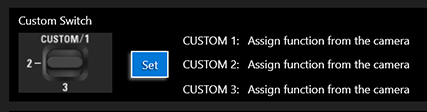 | Yes | Yes | Yes | – Custom Switch 1, 2 and 3 can be customized individually. – Focus Ring can be customized. |
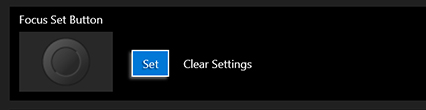 | − | Yes | Yes | – One function can be assigned to Focus Set Button. – Focus Ring can be customized. |
| − | − | Yes | – Focus Ring can be customized. |
Important Information
- TAMRON Lens Utility™ is compatible with TAMRON lenses equipped with a Connector Port (USB Type-C).
- When connecting your lens to a PC or smartphone, please use a TAMRON Connection Cable (optional).
- Please note that the information and products described in this page, and details including the specifications, features and performance of the software are subject to change without prior notice.
- The software cannot be used for commercial purposes or any purpose other than its intended use for personal enjoyment, without permission.
- Please note that TAMRON will not provide compensation for any incidental damages arising from defects in the software.
- Microsoft and Windows are registered trademarks of Microsoft Corporation in the United States and other countries.
- Macintosh, Mac and OSX are trademarks of Apple Inc. registered in the United States and other countries.
Connect TAMRON Lens Utility
For Mobile
Turn on the camera and connect the smartphone to the lens using the TAMRON Connection Cable (optional).
For PC
Connect the Lens to a Computer
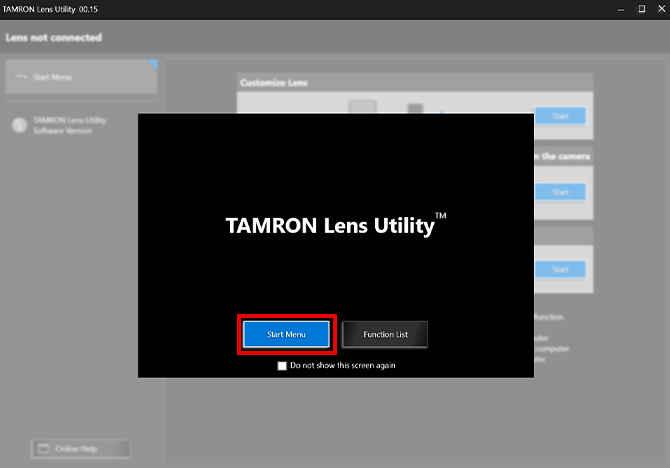
❶ After launching TAMRON Lens Utility, click [Start Menu].
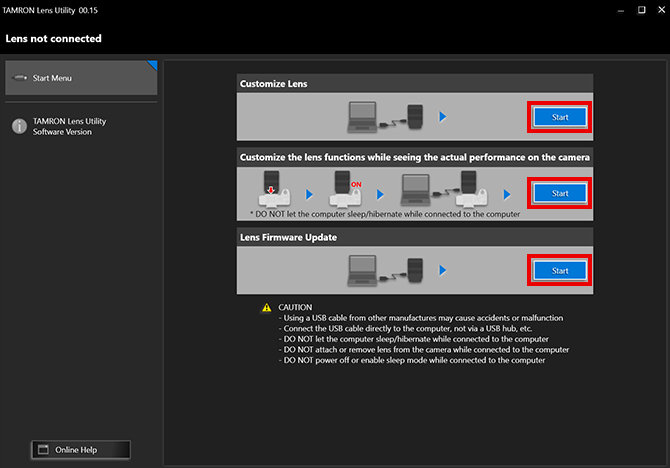
❷ Follow the instructions on the start screen to connect the lens to a computer. There are three ways to connect lens to computer. Choose the method that suits your purpose.
- When selecting “Customize Lens”
①Connect your computer and lens using the TAMRON Connection Cable.
②Click [Start]. - When selecting “Customize the lens functions while seeing the actual performance on the camera”
①Attach the lens to the camera.
②Switch the camera on (* Disable sleep mode before use).
③Connect the computer and lens using the TAMRON Connection Cable.
④Click [Start]. - When selecting “Lens Firmware Update”
①Connect your computer and lens using the TAMRON Connection Cable.
②Click [Start].
Safely Remove the Lens
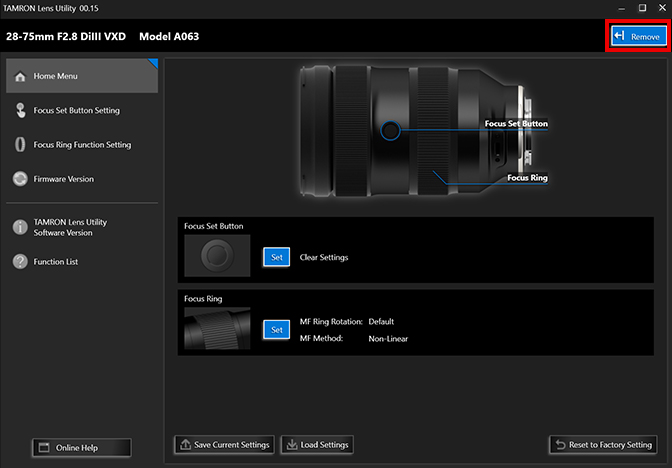
❶ To safely remove the lens, click [Remove] at the top-right of the screen.
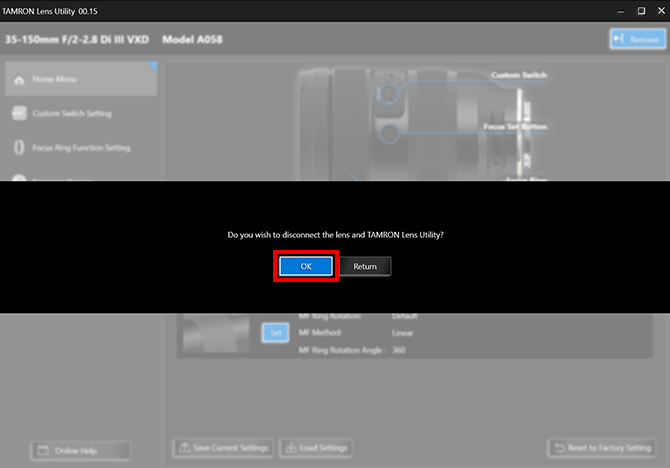
❷ Select [OK] to disconnect the lens from the computer.
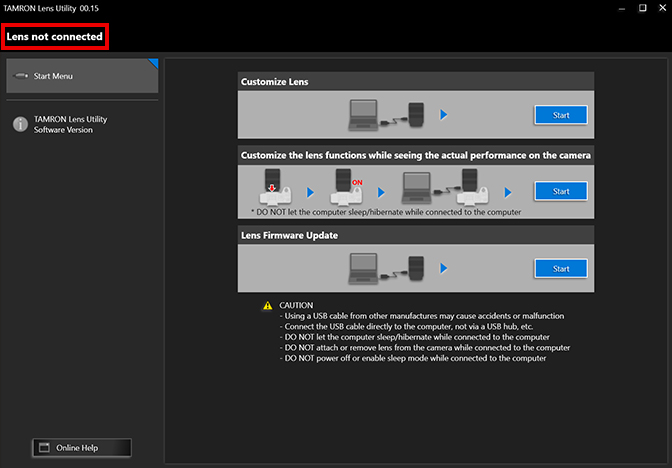
❸ Remove the cable after confirming that the Software is not connected.
When connecting your lens to a computer, please use a TAMRON Connection Cable
Functions
Various Functions
Select AF/MF
Switch between Autofocus and Manual Focus
This function switches between AF and MF using the Focus Set Button on lenses that lack an AF/MF switch. This makes operation easier when shooting scenes that require frequent use of AF/MF switching.

A-B Focus
Lets you smoothly and easily shift focus from one subject to another
This function allows you to shift focus at a preset speed, as is frequently done when recording video. Get exactly the kind of visual expression you want, for example, by slowly shifting the focus from a distant subject to one closer to you, or by guiding the gaze of the person viewing the video. Use the Focus Set Button or Remote Set Button to record two preset focal points in advance. Afterwards, a simple press allows you to shoot while moving focus automatically and at a set speed; you don’t have to worry about the speed blur associated with manual focus, and you can achieve stable visual expression.

Focus Preset
Move focus to a prerecorded focal point with one press
This function allows you to preset focal points, for example, to deliberately defocus a subject during a video transition or to access a focal point for night photography. You can set the focus travel time when recording video. You can also set focus on a preset focal point at maximum speed with a single press when taking still photographs. This feature broadens the range of your visual expression.

Astro Focus Lock (Astro FC-L)
Function to support focusing for astrpphotography
Focal Point will automatically be fixed at infinity to assist you in finding the focus point for astrophotography.
*The focus ring will be disabled until Astro FC-L is released to prevent focus deviation due to incorrect operation.

Focus Stopper
Focus range can be set with the lens alone during movie recording
Limit the MF travel range between any two focal points that have been recorded beforehand. It is easy to change and set the position of the focus stopper, you can create images without worry about 「Over Passing」the focal point.

Focus Limiter
Choose the focus search range to best suit your photography situation
The Focus Limiter helps you to avoid accidental focus on a subject, for example when there is something located in front of your subject. By limiting the focus range, when the focus moves unintentionally you can quickly focus back to your subject again.
TAMRON’s unique functions
– Focus search range between Full <=> Limit can be switched easily by pressing the Focus Set Button
– There are choices to momentarily limit or free the focus search range
– Focus limit distance setting can be customized to suite your needs
(* Limit settings will differ between lenses with this feature)
Please download and use the latest version of the software.

Ring Function (Focus/Aperture)
Switch function from focus adjustment to aperture adjustment
This changes the Focus Ring Function from focus adjustment to aperture adjustment using the Focus Set Button.

MF Ring Rotation
This function changes the direction the focus ring rotates during manual focus.
You can choose the direction that the Focus Ring rotates. It can be set to the same direction of rotation as your camera manufacturer’s lenses or the reverse.

MF Method
This function adjusts focus movement when using manual focus. You can choose between “Non-linear,” where the amount of focal point movement changes based on how fast you rotate the focus ring, and “Linear,” where the focal point moves based on how much you rotate the focus ring. Some lenses allow users to adjust rotation as well, to offer more personalization.
Assign Function from the Camera
Functions of the camera body can be assigned to the Focus Set Button
This reassigns the Focus Set Button to activate the function that you assign to it via the camera body.
Various Functions
Select AF/MF
Switch between Autofocus and Manual Focus
This function switches between AF and MF using the Focus Set Button on lenses that lack an AF/MF switch. This makes operation easier when shooting scenes that require frequent use of AF/MF switching.
A-B Focus
Lets you smoothly and easily shift focus from one subject to another
This function allows you to shift focus at a preset speed, as is frequently done when recording video. Get exactly the kind of visual expression you want, for example, by slowly shifting the focus from a distant subject to one closer to you, or by guiding the gaze of the person viewing the video. Use the Focus Set Button or Remote Set Button to record two preset focal points in advance. Afterwards, a simple press allows you to shoot while moving focus automatically and at a set speed; you don’t have to worry about the speed blur associated with manual focus, and you can achieve stable visual expression.
Focus Preset
Move focus to a prerecorded focal point with one press
This function allows you to preset focal points, for example, to deliberately defocus a subject during a video transition or to access a focal point for night photography. You can set the focus travel time when recording video. You can also set focus on a preset focal point at maximum speed with a single press when taking still photographs. This feature broadens the range of your visual expression.
Astro Focus Lock (Astro FC-L)
Function to support focusing for astrpphotography
Focal Point will automatically be fixed at infinity to assist you in finding the focus point for astrophotography.
*The focus ring will be disabled until Astro FC-L is released to prevent focus deviation due to incorrect operation.
Focus Stopper
Focus range can be set with the lens alone during movie recording
Limit the MF travel range between any two focal points that have been recorded beforehand. It is easy to change and set the position of the focus stopper, you can create images without worry about 「Over Passing」the focal point.
Focus Limiter
Choose the focus search range to best suit your photography situation
The Focus Limiter helps you to avoid accidental focus on a subject, for example when there is something located in front of your subject. By limiting the focus range, when the focus moves unintentionally you can quickly focus back to your subject again.
TAMRON’s unique functions
– Focus search range between Full <=> Limit can be switched easily by pressing the Focus Set Button
– There are choices to momentarily limit or free the focus search range
– Focus limit distance setting can be customized to suite your needs
(* Limit settings will differ between lenses with this feature)
Please download and use the latest version of the software.
Ring Function (Focus/Aperture)
Switch function from focus adjustment to aperture adjustment
This changes the Focus Ring Function from focus adjustment to aperture adjustment using the Focus Set Button.
MF Ring Rotation
This function changes the direction the focus ring rotates during manual focus.
You can choose the direction that the Focus Ring rotates. It can be set to the same direction of rotation as your camera manufacturer’s lenses or the reverse.
MF Method
This function adjusts focus movement when using manual focus. You can choose between “Non-linear,” where the amount of focal point movement changes based on how fast you rotate the focus ring, and “Linear,” where the focal point moves based on how much you rotate the focus ring. Some lenses allow users to adjust rotation as well, to offer more personalization.
Assign Function from the Camera
Functions of the camera body can be assigned to the Focus Set Button
This reassigns the Focus Set Button to activate the function that you assign to it via the camera body.
Clear Settings
This setting disables the Focus Set Button.
Save or Load Customized Data to/from File
You can save customized data as files on your computer and recall them later.
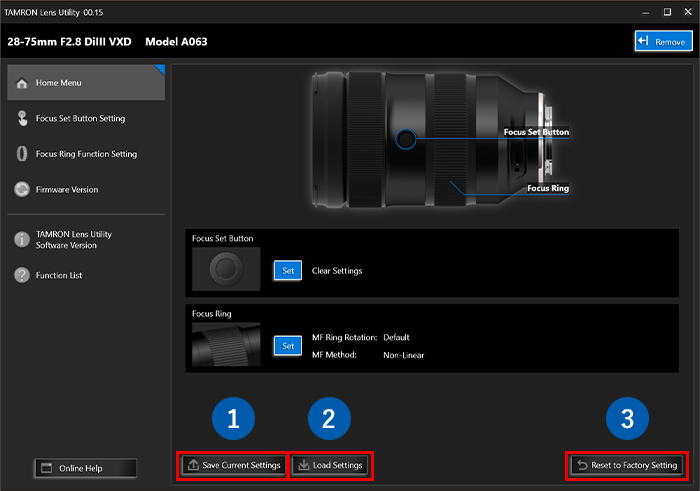
❶ To save customized data, click [Save Current Settings]. When the dialog box “Save as” appears, choose the folder for saving data, enter a file name, and save.
❷ To load a saved file containing customized data, click [Load Settings]. When the dialog box “Open a file” appears, choose the file you want to load and open it.
Reset to Factory Setting
❸ When you wish to choose the default settings, click [Reset to Factory Setting].
Firmware Updates
This feature lets you update the firmware of the lenses to the latest versions.
- All firmware updates for lenses that have a Connector Port are available via this software only. Please note that lens firmware cannot be updated via the camera.
Important Information When Updating Firmware
- Always make sure you have removed the camera from the lens before performing a firmware update.
- During a firmware update, never disconnect the lens or TAMRON Connection Cable from the computer.
- Do not turn off the power to computer, shut it down or place it into sleep mode during a firmware update. Configure the Power Settings of the computer in advance so that it does not automatically shut down or enter sleep/hibernation mode.
- Do not operate any other software during update.
- Do not connect a lens to your computer via a USB hub.
- For a laptop computer, power it with an AC adapter during updates.
- Your computer must access the internet when updating the firmware.
- After updating to the latest firmware, you will NOT be able to revert to a previous version.
Firmware Update Procedures
❶ Connect the computer and lens using the TAMRON Connection Cable.
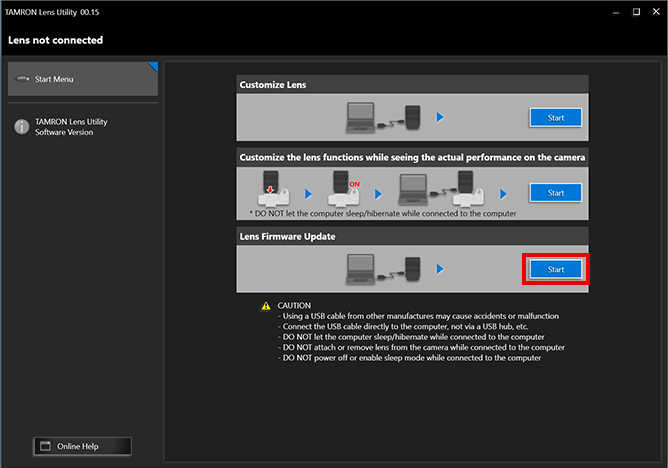
❷ Click [Start].
- Always make sure you have removed the camera from the lens before performing a firmware update.
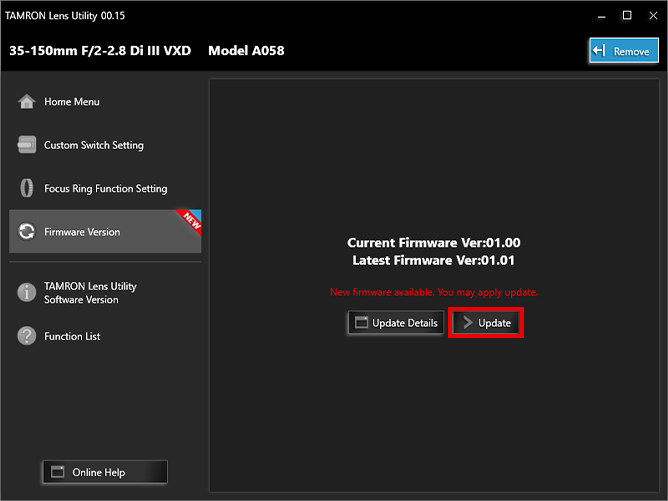
❸ On the firmware information screen, you can check your lens’s firmware version and the latest firmware version.
If there is a firmware update available for your lens, click [Update]. This starts the update.
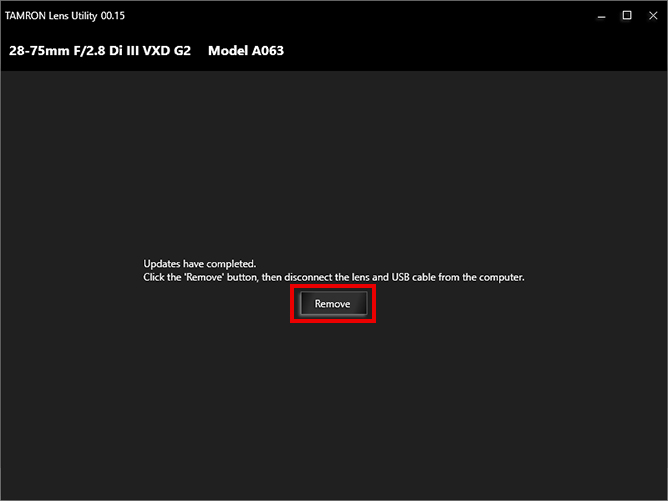
❹ When the firmware update is complete, a message will be displayed.
After clicking [Remove], remove your lens from TAMRON Connection Cable and the computer.
When connecting your lens to a computer, please use a TAMRON Connection Cable
Compatible Lenses List
Sony E-mount
| Product Name | Mobile Compatibility | Available with PC Version Only | Available with Mobile Version Only | Available with both PC/Mobile Version | ||||||||||||||||||
|---|---|---|---|---|---|---|---|---|---|---|---|---|---|---|---|---|---|---|---|---|---|---|
| Firmware | DFF (Digital Follow Focus) | Remote Set Button | Focus Set Button / Custom Switch Settings | Focus Ring Function Setting | ||||||||||||||||||
| Android OS | Update | Focus Control | Aperture Control | Focus Stopper | Astro FC-L | FC Marker | FC Ease | Focus Preset | A-B Focus | Assign Function from the Camera | Select AF/MF | Focus Preset | A-B Focus | Focus Stopper | Astro FC-L | Focus Limiter | Ring Function (Focus/Aperture) | Clear Settings | MF Ring Rotation | MF Method | ||
| Focus Method | Focus Rotation Angle | |||||||||||||||||||||
| 35-150mm F/2-2.8 Di III VXD (Model A058) | Yes | Yes | Yes | Yes | Yes | Yes | Yes | Yes | Yes | Yes | ‐ | Yes | Yes | Yes | Yes | ‐ | Yes | Yes | Yes | Yes | Yes | Yes |
| 28-75mm F/2.8 Di III VXD G2 (Model A063) | Yes | Yes | Yes | Yes | Yes | Yes | Yes | Yes | Yes | Yes | Yes | Yes | Yes | Yes | Yes | Yes | ‐ | Yes | Yes | Yes | Yes | ‐ |
| 50-400mm F/4.5-6.3 Di III VC VXD (Model A067) | Yes | Yes | Yes | Yes | Yes | Yes | Yes | Yes | Yes | Yes | Yes | Yes | Yes | Yes | Yes | Yes | Yes | Yes | Yes | Yes | Yes | Yes |
| 20-40mm F/2.8 Di III VXD (Model A062) | Yes | Yes | Yes | Yes | Yes | Yes | Yes | Yes | Yes | Yes | ‐ | ‐ | ‐ | ‐ | ‐ | ‐ | ‐ | ‐ | ‐ | Yes | Yes | Yes |
| 70-180mm F/2.8 Di III VC VXD G2 (Model A065) | Yes | Yes | Yes | Yes | Yes | Yes | Yes | Yes | Yes | Yes | Yes | Yes | Yes | Yes | Yes | Yes | Yes | Yes | Yes | Yes | Yes | Yes |
| 17-50mm F/4 Di III VXD (Model A068) | Yes | Yes | Yes | Yes | Yes | Yes | Yes | Yes | Yes | Yes | Yes | Yes | Yes | Yes | Yes | Yes | ‐ | Yes | Yes | Yes | Yes | Yes |
| 50-300mm F/4.5-6.3 Di III VC VXD (Model A069) | Yes | Yes | Yes | Yes | Yes | Yes | Yes | Yes | Yes | Yes | Yes | Yes | Yes | Yes | Yes | Yes | Yes | Yes | Yes | Yes | Yes | Yes |
| 28-300mm F/4-7.1 Di III VC VXD (Model A074) | Yes | Yes | Yes | Yes | Yes | Yes | Yes | Yes | Yes | Yes | Yes | Yes | Yes | Yes | Yes | Yes | Yes | Yes | Yes | Yes | Yes | Yes |
| 90mm F/2.8 Di III MACRO VXD (Model F072) | Yes | Yes | Yes | Yes | Yes | Yes | Yes | Yes | Yes | Yes | Yes | Yes | Yes | Yes | Yes | Yes | ‐ | Yes | Yes | Yes | Yes | Yes |
| 16-30mm F/2.8 Di III VXD G2 (Model A064) | Yes | Yes | Yes | Yes | Yes | Yes | Yes | Yes | Yes | Yes | Yes | Yes | Yes | Yes | Yes | Yes | ‐ | Yes | Yes | Yes | Yes | Yes |
| 25-200mm F/2.8-5.6 Di III VXD G2 (Model A075) | Yes | Yes | Yes | Yes | Yes | Yes | Yes | Yes | Yes | Yes | Yes | Yes | Yes | Yes | Yes | Yes | Yes | Yes | Yes | Yes | Yes | Yes |
Nikon Z mount
| Product Name | Mobile Compatibility | Available with PC Version Only | Available with Mobile Version Only | Available with both PC/Mobile Version | ||||||||||||||||||
|---|---|---|---|---|---|---|---|---|---|---|---|---|---|---|---|---|---|---|---|---|---|---|
| Firmware | DFF (Digital Follow Focus) | Remote Set Button | Focus Set Button / Custom Switch Settings | Focus Ring Function Setting | ||||||||||||||||||
| Android OS | Update | Focus Control | Aperture Control | Focus Stopper | Astro FC-L | FC Marker | FC Ease | Focus Preset | A-B Focus | Assign Function from the Camera | Select AF/MF | Focus Preset | A-B Focus | Focus Stopper | Astro FC-L | Focus Limiter | Ring Function (Focus/Aperture) | Clear Settings | MF Ring Rotation | MF Method | ||
| Focus Method | Focus Rotation Angle | |||||||||||||||||||||
| 70-300mm F/4.5-6.3 Di III RXD (Model A047) | ‐ | Yes | ‐ | ‐ | ‐ | ‐ | ‐ | ‐ | ‐ | ‐ | ‐ | ‐ | ‐ | ‐ | ‐ | ‐ | ‐ | ‐ | ‐ | ‐ | ‐ | ‐ |
| 35-150mm F/2-2.8 Di III VXD (Model A058) | Yes | Yes | Yes | ‐ | Yes | Yes | Yes | Yes | Yes | Yes | Yes | Yes | Yes | Yes | Yes | Yes | ‐ | ‐ | Yes | Yes | Yes | Yes |
| 150-500mm F/5-6.7 Di III VC VXD (Model A057) | ‐ | Yes | ‐ | ‐ | ‐ | ‐ | ‐ | ‐ | ‐ | ‐ | ‐ | ‐ | ‐ | ‐ | ‐ | ‐ | ‐ | ‐ | ‐ | ‐ | ‐ | ‐ |
| 28-75mm F/2.8 Di III VXD G2 (Model A063) | Yes | Yes | Yes | ‐ | Yes | Yes | Yes | Yes | Yes | Yes | Yes | Yes | Yes | Yes | Yes | Yes | ‐ | ‐ | Yes | Yes | Yes | ‐ |
| 50-400mm F/4.5-6.3 Di III VC VXD (Model A067) | Yes | Yes | Yes | ‐ | Yes | Yes | Yes | Yes | Yes | Yes | Yes | Yes | Yes | Yes | Yes | Yes | Yes | ‐ | Yes | Yes | Yes | Yes |
| 90mm F/2.8 Di III MACRO VXD (Model F072) | Yes | Yes | Yes | ‐ | Yes | Yes | Yes | Yes | Yes | Yes | Yes | Yes | Yes | Yes | Yes | Yes | ‐ | ‐ | Yes | Yes | Yes | Yes |
| 16-30mm F/2.8 Di III VXD G2 (Model A064) | Yes | Yes | Yes | ‐ | Yes | Yes | Yes | Yes | Yes | Yes | Yes | Yes | Yes | Yes | Yes | Yes | ‐ | ‐ | Yes | Yes | Yes | Yes |
| 18-300mmF/3.5-6.3Di III-A VC VXD(Model B061) | ‐ | Yes | ‐ | ‐ | ‐ | ‐ | ‐ | ‐ | ‐ | ‐ | ‐ | ‐ | ‐ | ‐ | ‐ | ‐ | ‐ | ‐ | ‐ | ‐ | ‐ | ‐ |
| 70-180mm F/2.8 Di III VC VXD G2 (Model A065) | Yes | Yes | Yes | Yes | Yes | Yes | Yes | Yes | Yes | Yes | Yes | Yes | Yes | Yes | Yes | Yes | Yes | ‐ | Yes | Yes | Yes | Yes |
CANON RF mount
| Product Name | Mobile Compatibility | Available with PC Version Only | Available with Mobile Version Only | Available with both PC/Mobile Version | ||||||||||||||||||
|---|---|---|---|---|---|---|---|---|---|---|---|---|---|---|---|---|---|---|---|---|---|---|
| Firmware | DFF (Digital Follow Focus) | Remote Set Button | Focus Set Button / Custom Switch Settings | Focus Ring Function Setting | ||||||||||||||||||
| Android OS | Update | Focus Control | Aperture Control | Focus Stopper | Astro FC-L | FC Marker | FC Ease | Focus Preset | A-B Focus | Assign Function from the Camera | Select AF/MF | Focus Preset | A-B Focus | Focus Stopper | Astro FC-L | Focus Limiter | Ring Function (Focus/Aperture) | Clear Settings | MF Ring Rotation | MF Method | ||
| Focus Method | Focus Rotation Angle | |||||||||||||||||||||
| 11-20mm F/2.8 Di III-A RXD (Model B060) | ‐ | Yes | ‐ | ‐ | ‐ | ‐ | ‐ | ‐ | ‐ | ‐ | ‐ | ‐ | ‐ | ‐ | ‐ | ‐ | ‐ | ‐ | ‐ | ‐ | ‐ | ‐ |
| 18-300mm F/3.5-6.3 Di III-A VC VXD (Model B061) | ‐ | Yes | ‐ | ‐ | ‐ | ‐ | ‐ | ‐ | ‐ | ‐ | ‐ | ‐ | ‐ | ‐ | ‐ | ‐ | ‐ | ‐ | ‐ | ‐ | ‐ | ‐ |
Articles / Videos / Reviews
Reviews / Articles

Let’s take a short movie with an interchangeable-lens camera and create a cinematic look with focus work that makes use of the lens’s bokeh! Part 2: About “Focus work”

Let’s take a short movie with an interchangeable-lens camera and create a cinematic look with focus work that makes use of the lens’s bokeh!
Part 1: About “Composition, Direction, and Focus Work”

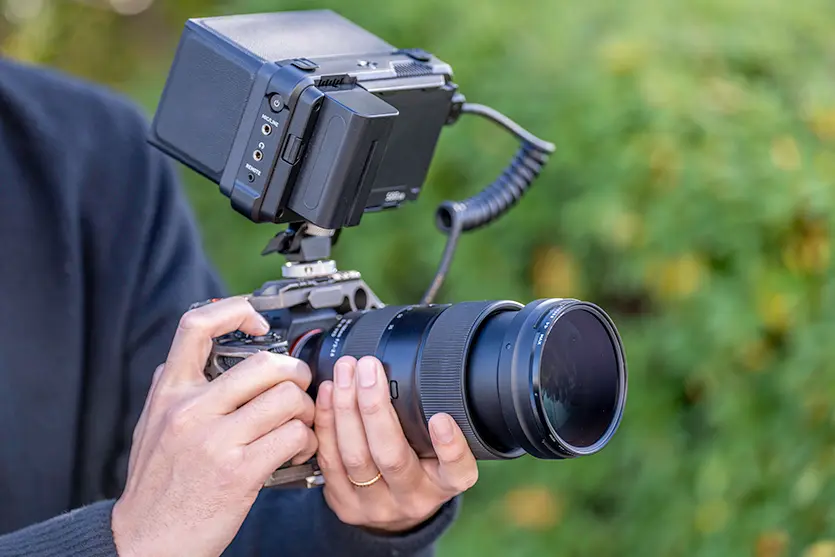



Exploring the starry skies captured with [Astro Focus Lock], a revolutionary new feature of the TAMRON Lens Utility that solves the issues encountered with astrophotography